Target Audience Template: How to Identify and Engage Your Ideal Audience in 2026
Do you know exactly who your business is speaking to? Many professionals — from entrepreneurs to educators — struggle with this question. Without a clear understanding of your audience, even the best products and marketing campaigns can fall flat.
That’s where a target audience template becomes your secret weapon. It helps you define your ideal customers, uncover their needs, and tailor your strategies for better engagement and results.
Whether you’re a business owner, product manager, educator, event planner, or HR professional, this guide will walk you through everything you need to know about creating and using a powerful target audience template in 2026.
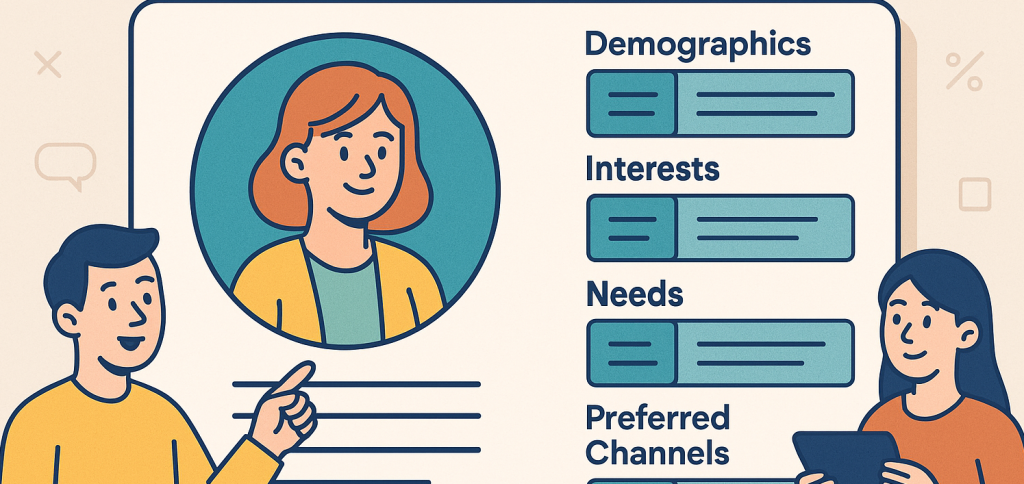
What Is a Target Audience Template?
A target audience template is a structured tool that helps you document, visualize, and analyze your ideal customer or audience. It’s like a blueprint that outlines:
Who they are (demographics)
What they care about (psychographics)
Where they are (location & channels)
Why they act (motivations and challenges)
How they engage (behaviors and preferences)
Instead of guessing your customers’ needs, this template helps you turn assumptions into data-driven insights — essential for marketing, product design, education, and HR communication.
Why It Works
A target audience template forces clarity. It gives structure to your audience research and ensures every team — marketing, product, education, or HR — works from the same understanding of who you serve.
Why You Need a Target Audience Template in 2026
1. Marketing and Communication Are Noisy
In 2026, every industry faces oversaturation. The only way to stand out is to personalize your message — and personalization starts with knowing your audience deeply.
2. Data Is Abundant but Directionless
Analytics tools can show what people do, but not why. A target audience template helps translate data into insight by connecting numbers to real human behavior.
3. Global Teams Need Alignment
With global workforces and customers, consistency matters. A shared audience template keeps everyone — from your social media team to your HR recruiters — aligned on audience goals and tone.
4. It Drives Smarter Decision-Making
When you know who you’re targeting, you avoid wasted effort. From campaign budgets to event planning, every decision becomes more strategic.
Who Should Use a Target Audience Template?
1. Business Owners
For entrepreneurs, defining a target audience is the foundation of brand growth. A template helps you:
Identify your most profitable customer segment.
Align messaging across marketing, sales, and service.
Create offers that resonate with real pain points.
Example: A boutique coffee brand uses its template to target “Remote Professionals (25–40, urban, mid-income)” who value sustainable sourcing and productivity boosts.
2. Product Managers
A product is only as good as its user fit. Product managers use audience templates to:
Map user personas for new features.
Align design and engineering around customer needs.
Prioritize product roadmap items based on audience demand.
Example: A SaaS startup identifies its “Tech-Savvy Managers” persona using its audience template — leading to new automation tools that increased retention by 30%.
3. Educators & Course Creators
Teaching without understanding your learners is like throwing darts in the dark. Educators use target audience templates to:
Design relevant courses for specific student demographics.
Adjust tone and teaching style to learner preferences.
Personalize content for better engagement.
Example: An online instructor identifies her core audience as “Working Parents Aged 30–45,” leading her to create short, modular lessons compatible with tight schedules.
4. Event Planners
Events succeed when they resonate with attendees. Planners use audience templates to:
Segment attendee types (VIPs, sponsors, vendors, general guests).
Design experiences tailored to each segment.
Predict turnout and measure satisfaction.
Example: A global conference team profiles their “Corporate Innovator” audience, crafting agendas around innovation topics and networking sessions instead of generic panels.
5. HR Professionals
For HR teams, understanding internal and external audiences — employees, applicants, or trainees — is essential. Templates help HR professionals:
Personalize recruitment campaigns.
Design targeted wellness or training programs.
Communicate policies more effectively.
Example: An HR team builds an audience template for “Millennial Employees” to enhance engagement by introducing flexible scheduling and feedback-driven reviews.
How to Build a Target Audience Template (Step by Step)
Step 1: Define the Purpose of Your Template
Ask yourself: What goal will this audience definition serve?
Marketing campaigns?
Product development?
HR recruitment?
Educational design?
Each goal shapes the type of data you’ll collect.
Step 2: Gather Data About Your Audience
Collect both quantitative (numbers) and qualitative (insights) data.
Sources include:
Website analytics (Google Analytics, social media insights)
Surveys and feedback forms
Customer interviews
CRM or HR data
Competitor audience analysis
The key is to understand behavior, not just demographics.
Step 3: Structure the Template
Here’s a simple outline you can customize:
| Category | Details to Include |
|---|---|
| Audience Name | Give your segment a descriptive title (e.g., “Creative Freelancers”) |
| Demographics | Age, gender, education, income, job role, location |
| Psychographics | Values, goals, interests, attitudes |
| Pain Points | Challenges or frustrations they face |
| Motivations | What drives their decisions |
| Preferred Channels | Social media, email, in-person events, etc. |
| Buying/Engagement Behavior | How they research, purchase, or interact |
| Key Message | Core statement that resonates with this audience |
| Action Plan | How your team will address or target this group |
Step 4: Segment Your Audiences
Avoid the “everyone is our audience” trap. Divide your audience into clear segments:
Primary Audience – Your main focus (highest value customers or users).
Secondary Audience – A smaller but still relevant group.
Tertiary Audience – Potential long-term or adjacent markets.
Each segment should have its own mini-template for detailed understanding.
Step 5: Create Visual Personas
Visuals make templates memorable. Include a persona card with:
A stock image representing the audience
A short “bio” paragraph
Their main quote or mindset
Example Persona Bio:
“I’m Olivia, a 32-year-old remote project manager. I’m tech-savvy but overwhelmed by information overload. I value clear, concise tools that save time.”
Adding human-like stories helps teams empathize rather than just analyze.
Step 6: Validate with Real Data
Once your initial draft is complete, test your assumptions:
Run A/B tests on messaging.
Conduct focus groups or surveys.
Review performance metrics over time.
Then refine your template based on real-world responses.
Step 7: Keep It Dynamic
Your audience evolves. Review your template every six months to ensure it still reflects real-world behavior, preferences, and needs — especially in global markets that shift quickly.
Example: Target Audience Template for Global Teams
Persona Name: Rajesh, the Global Product Lead
Age: 38
Industry: Technology
Location: India, works with teams across Europe and North America
Goals: Improve remote collaboration and time efficiency
Pain Points: Miscommunication, timezone overlap, lack of engagement tools
Preferred Platforms: Slack, Zoom, LinkedIn
Motivation: Building cohesive, productive teams across borders
Key Message: “Connect your teams effortlessly — anytime, anywhere.”
This simple profile gives marketing, HR, and product design teams a clear direction for communication and feature prioritization.
Best Practices for Using a Target Audience Template
Be specific, not broad: “HR professionals in North America” beats “employees.”
Use real language: Mirror how your audience speaks in their everyday life.
Back up assumptions with data: Validate personas through analytics and surveys.
Include emotional triggers: Know what drives them emotionally — not just logically.
Share across departments: Every team should use the same template for consistency.
Leverage automation tools: Use software (like FormBot) to manage and update templates.
Common Mistakes to Avoid
Copying generic templates: Customize for your unique audience and brand.
Skipping psychographics: Focusing only on demographics gives an incomplete picture.
Creating too many personas: Limit to 3–5 actionable profiles.
Letting templates collect dust: Revisit quarterly to stay aligned with market changes.
Not acting on insights: A template is only useful if it drives decisions.
Frequently Asked Questions (FAQs)
Q1: What’s the difference between a target audience and a buyer persona?
A target audience defines a broad group (e.g., “small business owners”), while a buyer persona is a detailed profile of one ideal customer within that audience (e.g., “Lisa, the local bakery owner”).
Q2: How often should I update my target audience template?
Ideally, every six months — or immediately after major market or audience shifts (new product launches, global trends, etc.).
Q3: Can a single business have multiple target audiences?
Yes! But prioritize. Focus on 2–3 primary audiences that represent your strongest opportunities.
Q4: Is this useful for non-profits or educators?
Absolutely. Templates help schools, charities, and NGOs define their ideal supporters, learners, or donors — improving engagement and impact.
Q5: What tools can I use to build my template?
Try FormBot, Google Forms, Notion, or Miro to design, store, and share your templates efficiently.
Final Thoughts and Call to Action
In a world where attention is fleeting and competition fierce, understanding your audience is your superpower. A target audience template gives structure to that understanding — aligning teams, refining strategy, and amplifying impact.
Whether you’re designing a product, launching a marketing campaign, teaching a course, or managing employees, knowing who you serve changes everything.
So, don’t guess your audience — define them.
👉 Start building your custom Target Audience Template today at FormBot.
Simplify data collection, personalize engagement, and connect with the people who truly matter to your brand in 2026 and beyond.
Get Started and Create Forms for Free?
 (1 votes, average: 5.00 out of 5)
 Loading...